
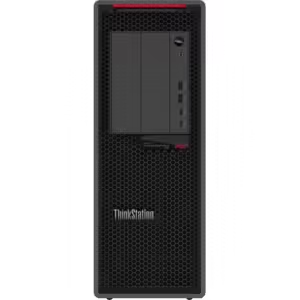
- You cannot add "Lenovo ThinkStation P3 30H00010US Workstation" to the cart because the product is out of stock.


Dell UltraSharp U2724DE 27″ Class WQHD LED Monitor
$567.99
Description
Unparalleled visual comfort
Ambient Light Sensor: A built-in Ambient Light Sensor intelligently optimizes brightness and color temperature based on your surroundings.
Improved ComfortView Plus: Reduces harmful blue light emissions to <35%, for all-day comfort without sacrificing color accuracy.
A smoother visual experience: A 120Hz refresh rate delivers less flicker, more seamless scrolling and smoother motion than 60Hz monitors.
Work vibrantly
Superior image quality: This IPS Black panel technology monitor has deeper blacks and greater gray color level accuracy, delivering exceptional contrast (2000:1) across a wide viewing angle.
Vivid, lifelike color: Enjoy 1.07 billion colors and a wide color coverage across industry standards, including 98% DCI-P3, 98% Display P3, 100% sRGB and 100% BT.709. Get color calibration accuracy of Delta E < 2 (average) (sRGB, BT.709, Display P3, DCI-P3).
Connect to Productivity
Single-cable convenience: Thunderbolt 4 transmits data and video signals at speeds of up to 40Gbps and delivers up to 90W of power to your PC.
Stable connection: Enable fast Ethernet with speeds of up to 2.5GbE.
Reach peak productivity: Connect to two PC sources and Auto KVM will seamlessly switch controls over to the second connected PC. Use KVM (keyboard, video and mouse) features to control both PCs with a single keyboard and mouse.
See more on one screen: View content from two PC sources with Picture-in-Picture (PiP) and Picture-by-Picture (PbP).
Extend your connectivity: Connect to more with DisplayPort 1.4, HDMI (HDCP 1.4)(supports up to QHD 2560 x 1440 120Hz TMDS, VRR as specified in HDMI 2.1), USB-A and USB-C ports that provide speeds of up to 10Gbps.
Connect with ease: Simply plug in accessories and devices with a quick access USB-A port and a USB-C port that delivers up to 15W of power.
Expand your perspective
Experience uncompromised picture quality by daisy chaining two monitors.
Designed for comfort
Fit your work style: Tilt, swivel, pivot and adjust the height of your monitor to work your way.
Stay focused on your work: Our InfinityEdge screen provides a virtually borderless experience.
Work beautifully: A premium platinum silver finish enhances any workspace.
Dell Color Management
Customizable colors: Easily calibrate your monitor’s colors with the new Dell Color Management software, with Calman Verified certification.
Tailored to you: Create, store, and manage ICC profiles on your computer dynamically through the software dashboard.
Wide compatibility: Dell Color Management software is compatible with multiple operating systems including Windows and macOS®.
Dell Display Manager
Easy management. Next-level productivity.
Improved multitasking: Organize your screen with Easy Arrange and save profiles with Easy Arrange Memory.
Easy navigation: Share a single keyboard, mouse and monitor between multiple PCs with USB KVM wizard. Quickly switch between PCs with the quick-access menu or hot keys.
Smooth deployment: Manage your fleet of monitors with features that are automatic, comprehensive and compatible with several tools.
Convenient customization: Quickly access your favourite features and functions with the menu launcher and hot keys.
- 5 ms response time makes it excellent for latest action films, sports or gaming
- 350 Nit brightness gives an exceptional visible display for clear and consistent on-screen pictures
- Furnishes captivating visuals with 350 Nit brightness levels
- Four times the resolution of HD with WQHD mode, permits you to have more multimedia content shown without any delay with amplified efficiency
- Edge LED backlighting technology for a bright and sharp display
- LED Monitor offers maximum productivity with added dependability
- LED Monitor is reliable and offers convenient usage
- USB Type-C offers a more refined structure and safer to use connectivity
- USB Type-C allows powerful and efficient transfer of data with maximum productivity
- 27″ viewable screen size showcases movies, games, and photos with striking clarity
- 27″ viewable screen size provides a spectacular viewing experience
- 2560 x 1440 maximum resolution for a vivid, crystal clear display with added productivity
- 2560 x 1440 maximum resolution for a spectacular, sharp display with added reliability
- 120 Hz standard refresh rate reduces deterioration caused by blurring to ensure maximum productivity
- 120 Hz standard refresh rate reduces blur to ensure maximum efficiency
- 16:9 widescreen resolution perfect for watching movies, playing video games and getting on with office work
| Audio | |
| Speakers | No |
| Built-in Devices | |
| Built-in Devices | USB Hub |
| KVM Switch | |
| Environmental Conditions | |
| Maximum Operating Altitude | 16404 ft |
| Maximum Non-operating Altitude | 40000 ft |
| Power Description | |
| Operating Power Consumption | 225 W |
| Standby Power Consumption | 500 mW |
| Maximum Power Consumption | 225 W |
| Off-Mode Power Consumption | 300 mW |
| General Information | |
| Product Type | LED Monitor |
| Manufacturer Part Number | DELLU2724DE |
| Manufacturer Website Address | http://www.delltechnologies.com |
| Manufacturer | Dell Technologies |
| Product Model | U2724DE |
| Product Name | UltraSharp U2724DE Widescreen LED Monitor |
| Product Line | UltraSharp |
| Brand Name | Dell |
| Miscellaneous | |
| Package Contents |
|
| Environmentally Friendly | Yes |
| Environmental Certification | TCO Certified Edge |
| Electronic Product Environmental Assessment Tool Gold (EPEAT Gold) | |
| Energy Star | Yes |
| TCO Certified | Yes |
| Environmental Compliance | Restriction of Hazardous Substances (RoHS) |
| Dell Display Manager Compatibility | Yes |
| Video | |
| Color Supported | 1.07 Billion Colors |
| Maximum Resolution | 2560 x 1440 |
| Standard Refresh Rate | 120 Hz |
| Native Contrast Ratio | 2,000:1 |
| Color Gamut | 98% Display P3 |
| 98% DCI-P3 | |
| 100% sRGB | |
| 100% BT.709 | |
| Pixel Per Inch (PPI) | 108.97 |
| Physical Characteristics | |
| Weight (Approximate) | 11.53 lb |
| Height | 13.9″ |
| Width | 24.1″ |
| Depth | 2″ |
| Weight with Stand (Approximate) | 16.25 lb |
| VESA Mount Compatible | Yes |
| VESA Mount Standard | 100 x 100 |
| Height with Stand | 21.09″ |
| Width with Stand | 24.10″ |
| Depth with Stand | 7.57″ |
| Color Family | Dual Color |
| Compressed Height with Stand | 15.18″ |
| Extended Height with Stand | 21.09″ |
| Interfaces/Ports | |
| USB | Yes |
| HDMI | Yes |
| HDMI Version | 2.1 |
| Network (RJ-45) | Yes |
| Number of USB Ports | 6 |
| Audio Line Out | Yes |
| DisplayPort | Yes |
| Number of HDMI Inputs | 1 |
| Thunderbolt | Yes |
| Number of DisplayPorts | 2 |
| Total Number of HDMI Ports | 1 |
| USB Type-C | Yes |
| DisplayPort Output | Yes |
| Number of DisplayPort 1.4 Ports | 2 |
| Number of HDMI 2.1 (HDCP 1.4) | 1 |
| Number of Audio Line Out Ports | 1 |
| Thunderbolt 4 | Yes |
| Technical Information | |
| Aspect Ratio | 16:9 |
| Pixel Pitch | 9.2 mil |
| Features | PowerNap |
| Security Lock | |
| sRGB | |
| Stand Lock | |
| Wide Viewing Angle | |
| Ambient Light Sensor | |
| Anti-glare | |
| Cable Lock Slot | |
| Color Calibration | |
| ComfortView Plus | |
| Digital Daisy Chain | |
| Easy Arrange | |
| Eye Comfort Technology | |
| Flicker-free | |
| Low Blue Light | |
| Picture by Picture | |
| Picture in Picture | |
| Viewable Screen Size | 27″ |
| Screen Mode | WQHD |
| Number of Screens | 1 |
| HDCP Supported | Yes |
| Horizontal Viewing Angle | 178° |
| Vertical Viewing Angle | 178° |
| Backlight Technology | Edge LED |
| Panel Technology | In-plane Switching (IPS) Black Technology |
| Stand Included | Yes |
| Screen Size Class | 27″ |
| Stand Adjustments | Tilt |
| Pivot | |
| Height | |
| Swivel | |
Specification
Additional information
| upc | 884116452164 |
|---|---|
| brand | DELL MONITORS |
| part_number | DELL-U2724DE |



Reviews
There are no reviews yet.